
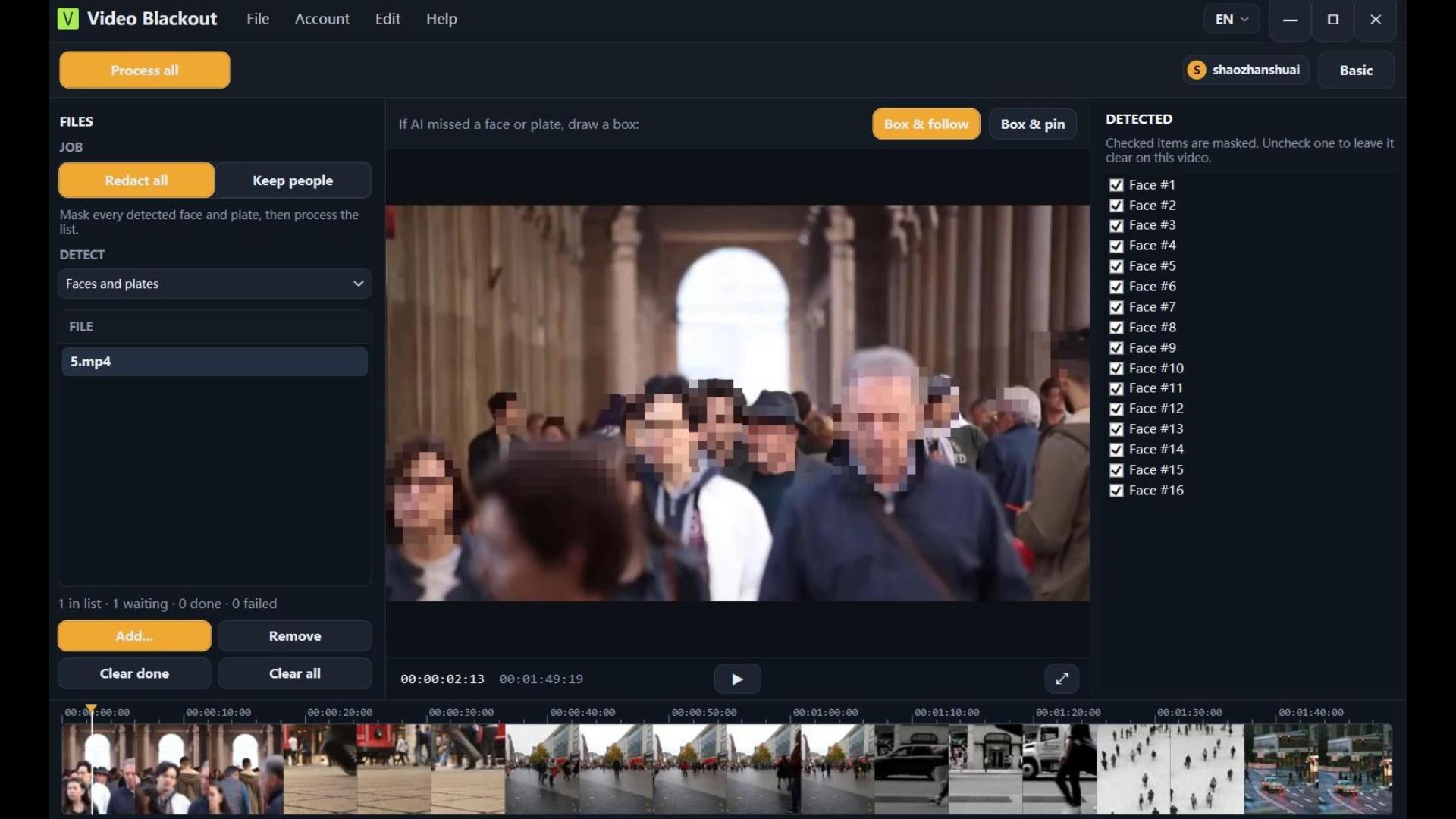
AI face & plate detection
On-device detectors propose boxes. Keep selected people clear. Draw extra boxes when detection misses.
Turn tedious manual editing into a few clicks. Our AI instantly detects faces and plates, while keeping your sensitive files strictly offline . Foolproof compliance, zero editing skills required.
No internet connection required.
Permanent pixel burn-in
100% local processing
Permanent pixel burn-in
Built for compliance teams
Video Blackout rewrites every marked region in the frame buffer before encoding. Mosaic, blur, and solid fill replace the original pixels and ship inside a new H.264 MP4 — there is no privacy overlay, mask track, or hidden clear copy that editors or image tools can strip away.
Player privacy modes and many cloud tools only draw a temporary cover. Ours is different: the release file no longer contains the clear pixels.
Everything runs on your machine. Export permanently rewrites pixels — editors cannot strip a blur layer to restore the original.
On-device detectors propose boxes. Keep selected people clear. Draw extra boxes when detection misses.
Draw boxes for faces, plates, badges, or screens. Follow with CSRT, or lock a rectangle for a time range.
Mark mute or beep spans on the timeline. No speech recognition — audio is operator-timed only.
Choose the style your policy requires. Every option rewrites pixels in the export — not a removable overlay that image tools can peel off.
No upload pipeline on this site or in the app workflow. Ideal for schools, law, and security.
Short guides for the identifiers teams search for most — each links to a deeper page.
Auto-detect faces, keep selected people clear, and burn mosaic, blur, or solid into the export. No cloud upload.
Detect plates on-device, draw manual boxes for glare or misses, then track and burn the cover into the release file.
Cover faces, plates, badges, screens, and paperwork with auto-detect plus manual boxes — permanent pixels, not a removable overlay.
Mark mute or beep ranges by hand on the timeline. No speech recognition — selected audio is rewritten on export.
A short operator loop: detect, review, mark, export. No cloud hop in the middle.
Install on Windows 10/11. Sign in with Google or email, then bind a device license to the PC that will process footage.
Open a local video. Run face and/or plate detection, then review every proposed box before anything is burned in.
Draw manual boxes for badges, screens, or missed faces. Mark mute or beep ranges on the audio timeline by hand.
Export a new MP4 with redaction baked into pixels and selected audio rewritten. The original file is left untouched as your system of record.
The same offline workflow covers disclosure, surveillance review, and privacy responses — without uploading evidence to a SaaS editor.
Law enforcement and security teams redact faces and plates in body-worn camera footage offline before public release or internal sharing.
Schools, retail, and facilities anonymize surveillance clips for investigations or review — footage stays on the workstation, never uploaded.
U.S. agencies produce a public-records release copy that permanently masks identifiers before the file leaves the office.
DPOs handle DSAR and GDPR video requests on-premise, so sensitive footage never leaves the controlled environment.
Subscribe on the web, activate on your PC. No online video processing.
$0
$29/ month
1 device
$60/ month
2 devices
$450/ year
2 devices
Checkout requires a signed-in account. Licenses are bound to hardware IDs. Free works without an account.
Locale en
Download for Windows, try Free with a watermark, or subscribe when your team needs clean exports and batch processing.
Video redaction permanently covers identifying information so a released copy cannot reveal those identities. Video Blackout is desktop video redaction software for teams that must finish that work before a public records release, a DSAR response, or an internal review. Processing stays on the machine that opened the file. This site (videoredaction.io) does not accept uploads.
Faces and license plates support auto-detect and manual boxes. Audio supports manual time ranges only (mute or beep) — there is no speech-to-text. Other on-screen identifiers (badges, screens, paperwork) are drawn by the operator.
Video Blackout capabilities
| Identifier | Auto-detect | Manual |
|---|---|---|
| Faces | Yes — on-device detector | Yes — draw or adjust boxes; keep or redact per person |
| License plates | Yes — on-device detector | Yes — draw or track boxes |
| Other on-screen PII | No | Yes — static or tracked regions (badges, screens, paperwork) |
| Audio | No — no speech recognition | Yes — operator marks time ranges; mute or beep on export |
After install and license activation, you can redact on an air-gapped PC. Read more about offline and on-premise video redaction, AI video redaction, and video anonymization.